
Alexa & Echo guide · Based on my original video
Echo Dot Max Guide: Music, Smart Home and Settings
My February 2026 walkthrough brings the Echo guide series up to the Dot Max. It adds more smart-home hardware than the older Dot I covered, but the most useful setup choices are still music, rooms, communication permissions and a few reliable routines.
The main takeaway
The Dot Max makes the most sense when you want an audio-first Echo with built-in smart-home connectivity. You still need to check accessory compatibility and the Alexa features offered on your account.
Best for
Echo Dot Max owners setting up music and a connected home.
Before you start
You need an exact match to a different Echo generation or software interface. Check the model and feature notes below before following older demonstrations.
Device or topic
Echo Dot Max Guide
Original walkthrough
2026-02-14
Start here
What the Dot Max changes
What helps
- A written companion to my hands-on video
- Practical setup steps and examples
- Model and software differences called out
What to know
- No screen or camera for visual tasks
- Online services still depend on connectivity and accounts
- Alexa+ access, features and terms should be checked separately
What the Dot Max changes
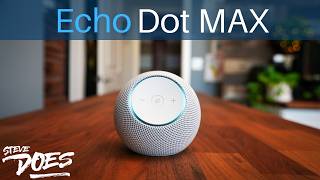
In my 2026 video I described the Dot Max as sitting between the smaller Dot idea and the larger Echo speakers I had used before. Its front-facing volume and microphone controls differ from the older top-button layout, and I noted the missing action button. It is still a speaker-focused device: there is no screen or camera, so it cannot display a doorbell feed or make a video call. There is also no battery for portable use. If those are the features you need, compare the Show guides before buying a speaker. The Dot Max shopping link points to the model covered in this walkthrough.
Set up music before exploring extra features
Link a supported music provider in the Alexa app and review the default-service settings. My walkthrough shows those options under the app's music area, but navigation can change as the app is updated. Test a normal request after signing in so you know the correct service and account are being used. Music, podcasts and audiobooks can have different access requirements. A supported provider does not mean its entire catalog is included with the device. You can also pair a phone over Bluetooth for audio from that phone, which is separate from requesting a linked streaming service directly through Alexa.
Choose a music group, stereo pair or home theater
These options solve different problems. A Multi-Room Music group is for playing across rooms. A stereo pair separates left and right channels on supported speaker combinations. A home-theater setup has its own Fire TV and Echo compatibility requirements. Do not buy another speaker assuming every combination works. In my demonstration I opened Combine Speakers to show the available options. Start there, select the system you want and follow the compatible-device list. Name a music group clearly enough that a spoken request will not be confused with a room or an individual device.
Adjust sound and external-speaker choices
I demonstrated the Dot Max's equalizer through the selected device's sound settings. Bass, mids and treble adjustments are worth trying after you choose its permanent position. A setting that sounds right beside a wall may not be the same on an open counter. The walkthrough also shows Bluetooth and a preferred-speaker option for a connected speaker. Check the connection and fallback behavior before relying on it for everyday listening. Keep the setup as simple as possible: if the built-in speaker already handles the room, adding another speaker may create more steps without fixing anything you actually dislike.
Understand its smart-home connections
The Dot Max includes a smart-home hub with Zigbee support, Matter compatibility and Thread border-router functionality, as covered in my video. That expands the types of accessories you can consider, but it does not guarantee compatibility with every product carrying one of those words. Follow the accessory's supported setup method and confirm which controls Alexa exposes. An existing product connected through a cloud skill can still have different dependencies from a locally connected accessory. Avoid treating the whole system as offline just because some devices can communicate locally. Voice services, account integrations and streaming still need their own connections.
Create room groups, then try presence or temperature
My first recommendation in the smart-home section was grouping devices by room. That lets a phrase such as turning on the lights make sense where you are speaking. Add the Echo and the room's lights to the appropriate group, then test the command. The Dot Max also offers sensing features for routines. Check the events available on your device and account, then start with a low-impact action such as a lamp. Give it time to demonstrate reliable behavior in its real location. Do not use a casual presence experiment as the only input for something safety-critical.
Review contacts, announcements and Drop In
In my walkthrough I left contact importing disabled and added the people I wanted individually. That is a useful approach when the Echo's purpose is communicating with a few family members rather than mirroring an entire address book. Announcements send a household message; Drop In opens a permitted connection. Review them separately. Check device communication settings, contact permissions and Do Not Disturb when a device is unavailable. Do not assume every failed connection has the same network cause. Test the feature with a person who knows you are testing it, then leave enabled only what the household wants.
Keep Alexa+ and eero expectations specific
My video discusses Alexa+ and eero Built-in. Treat access, subscriptions and supported configurations as items to check now, not permanent benefits inferred from an older recording. Alexa+ availability can depend on account and region. eero Built-in requires a supported eero setup; it is not a universal extender for any Wi-Fi router. If coverage is your main problem, compare the networking guides before expecting a speaker to solve it. For an existing Dot Max, I would finish music, room groups and one routine first. Those give the device a clear daily purpose while you decide which extra features you actually need.
Sources and feature checks
More Alexa, Echo and smart-home guides
What Can Echo Dot Do? A Guide to the 5th GenerationHow to Create Alexa Routines: A Beginner’s GuideAlexa Privacy Settings: What I Would Check FirstCommon questions
Does Echo Dot Max have a screen or camera?
No. Choose an Echo Show when you need visual timers, video calling or camera feeds on the device.
Can Echo Dot Max extend any Wi-Fi network?
No. eero Built-in is for supported eero configurations. Check compatibility before buying for that purpose.
Does built-in smart-home support make everything work offline?
No. Local device connectivity does not remove the dependencies of cloud skills, online voice services or streaming.
Compare before you buy
Which Amazon Echo Should You Buy?Watch the full walkthrough